
MCP Boundary 0.2.3
MCP Boundary wraps an existing local MCP server: your agent keeps the same tools, every call passes the boundary first.
It checks tool calls against your policy and the current state before any server tool is called.
When it blocks, the agent gets back a reason it can act on.
- State binding: bind writes to observed state - do not run a write if the world changed since the read
- Agent feedback: allow, block, or hold for review, with a structured reason the agent can act on
- Argument rules: restrict specific arguments, not whole tools - e.g. allow only certain recipients or IDs
- Loop prevention: limit response sizes and timeouts, and throttle repeated calls to contain runaway loops
- Tool exposure: choose which tools the agent sees - expose, hide, or keep dashboard-only
- Local dashboard: inspect every call, decision, reason, and outcome
Download
Windows ZIP and Linux tarball artifact smoke tested. SHA-256 checksums included.
Free for local evaluation, demos, and integration testing. Commercial production use requires a paid license - see terms.
Windows .zip
Downloadmcpboundary-v0.2.3-windows-amd64.zip · 4.4 MB
sha256:b1df85bf093366c4299169be348e5386d536b72c96f3386c254b0a15fce3e83cLinux .tar.gz
Downloadmcpboundary-v0.2.3-linux-amd64.tar.gz · 4.4 MB
sha256:0f2f8551f3fc501820d628f0bf503a0bfde01356425fc580278d3ca9e4c19f0cMCP Tool Rules
Write a policy for your MCP servers: which tools are visible, allowed, blocked, or limited.
- Agent asksThe agent requests a tool action.
- Boundary checksState, policy, and effect are checked before the tool acts.
- Core decidesThe call is allowed, blocked, or returned with feedback.
- Tool runs only after admissionOnly admitted work reaches the downstream tool.
What you see: an agent's tool call checked against policy and live state - allowed, or blocked with a reason the agent can act on.
Get notified about new versions
One email, only when a new version of MCP Boundary is released. No other mail, unsubscribe any time.
You will receive a confirmation email. Your signup is only complete after you click the confirmation link inside.
Extract the package, start the dashboard, let your agent act through the boundary.
The v0.2.3 package includes a local email demo that runs without provider credentials or a real inbox.
Download and extract
Use the Windows ZIP or the Linux tarball. Both release packages passed artifact smoke tests.
Start the dashboard, wrap your servers
Open the local dashboard, import your MCP servers, and route their tool calls through the boundary.
Let your agent act through the boundary
Point your agent at the wrapped servers. Every tool call is checked, and you see each decision in Activity.
Wrap your MCP servers in two minutes.
Works with local command-based MCP servers. Remote and login-heavy servers need separate support.
MCP Boundary runs locally. Feedback still matters.
MCP Boundary does not send your local MCP server config, discovered tools, policy files, activity logs, or downstream results back to Impact Boundary Labs. The public website may count release downloads in aggregate, and feedback you send by email is processed so we can improve the product.
A local dashboard for the run.
Inspect Setup, Tools, Rules, and Activity. See which tools are visible to the agent, which calls were blocked or allowed, and whether downstream execution happened.
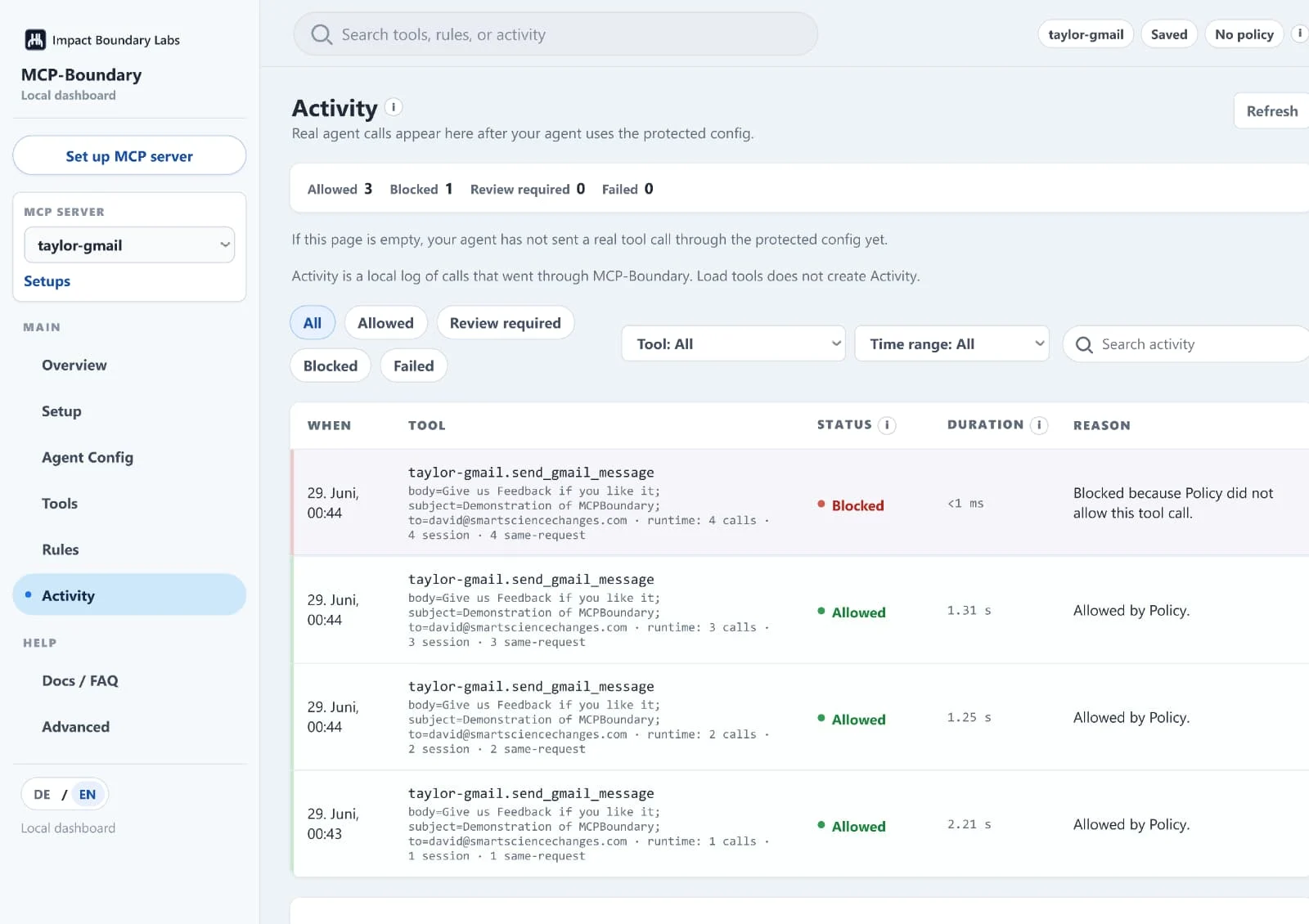
The same email call runs three times; the fourth is blocked by policy - logged with the reason.
Optional setup help
€139 one-time for an early-access setup slot.
MCP Boundary Local is free for local evaluation, demos, and integration testing. This is optional, hands-on setup help for a guided first setup.
Optional. You do not need this to evaluate MCP Boundary locally - this is paid, hands-on help if you want a guided first setup.
For builders and small teams working with real MCP servers or agent-tool workflows. Includes one focused setup session for one real MCP workflow.
We help you wrap one existing MCP server or workflow, inspect the available tools, define one guarded profile, and document which actions should be allowed, reviewed, or blocked.
Not a managed hosting plan, security audit, custom OAuth/provider integration, or a commercial-use agreement. It is a focused setup to test MCP Boundary on one real agent-tool workflow.
Evaluating MCP Boundary for commercial or production use? Contact us about design-partner access, deployment support, and commercial terms.
Works best with local command-based MCP servers.
If your MCP client can start the server with a local command, MCP Boundary can usually wrap it. Remote and login-heavy servers need separate support.
Works best with
- local command-based MCP servers
- stdio transport
- servers started with command + args
- npx, uvx, python, node, local binaries, or similar
- servers that support initialize and tools/list
- workflows where tool calls should be visible, restricted, or logged
Not ideal yet for
- remote OAuth-heavy MCP servers
- servers that require interactive login during startup
- servers that write logs to stdout
- non-standard transports
- servers that only work inside one specific client
MCP Boundary is not
A local boundary for command-based MCP servers - not a replacement for these:
- a full enterprise security gateway
- a DLP system
- a prompt-injection detector
- an automatic semantic safety engine for every MCP server
- a replacement for code review, database permissions, or email approval processes
- a hosted remote MCP gateway